Google Drive
 OneDrive
להלן נראה איך הופכים PDF לטופס למילוי
-
בחרו מסמך PDF קיים
לחץ על 'Upload' כדי לבחור קובץ. אין מסמך קיים? התחילו עם תבנית ריקה.
-
הוסיפו שדות למילוי לטופס ה-PDF שלכם
עברו על תוכן המסמך והוסיפו שדות למילוי היכן שצריך.
ניתן לבחור מסוגי השדות הבאים:
- שדה טקסט: שורת טקסט בודדת
- Textarea: שורות טקסט מרובות
- Radio: בחרו רק אחד מקבוצה
- Checkbox: סמנו אפשרות אחת או יותר
- Dropdown: בחרו אפשרות אחת או יותר מרשימה נפתחת
- תיבת חתימה: תיבת חתימה לאחרים
איך ליצור שדה טקסט ב-PDF למילוי
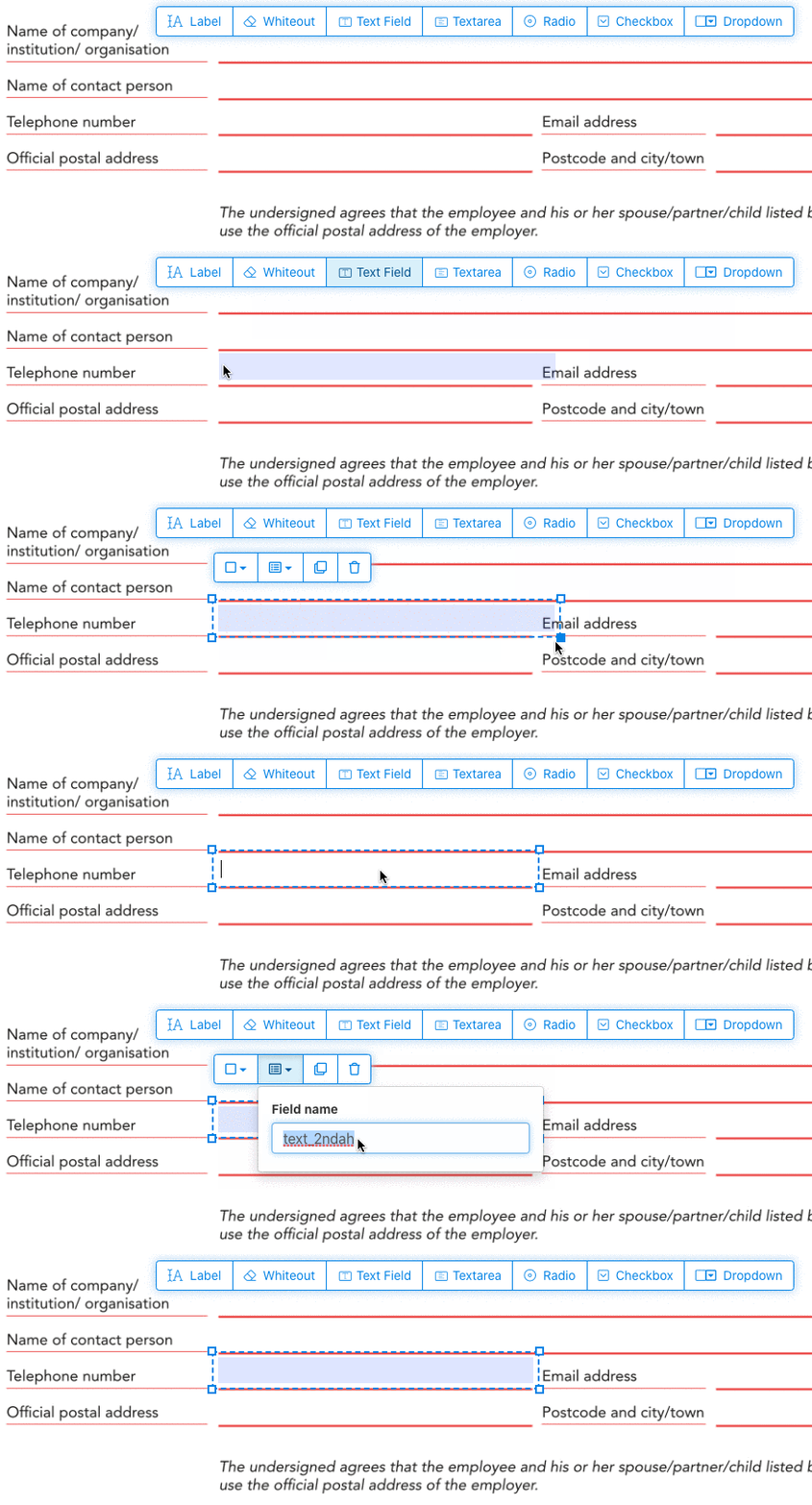
לחצו על פריט שדה הטקסט מהתפריט. ואז לחצו על העמוד כדי להציב שדה טקסט חדש.
![]()
צרו תיבות סימון, כפתורי רדיו או תפריט נפתח
ניתן להוסיף את כל שאר שדות הטופס באותו האופן.
כפתורי רדיו מקובצים יחד על ידי שימוש באותו שם שדה עבור כל הכפתורים. זה מבטיח שרק כפתור אחד ייבחר בו-זמנית. כשמשתמש בוחר אחד, הבחירה בשאר כפתורי הרדיו בקבוצה מתבטלת.
שנו את צבע המסגרת. הגדרת צבע טקסט בשדות טופס PDF
השתמשו בשדות טופס עם מסגרת שקופה או בחרו את הצבע המתאים לכם ביותר. ניתן להגדיר את צבע הטקסט בשדות ה-PDF.
ניתן להגדיר את יישור הטקסט כ-'Left', 'Center' או 'Right'. ניתן לקבוע גודל גופן ספציפי או להשאיר כ-'Auto' כך שיתואם אוטומטית לפי כמות הטקסט שהוקלדה.
שלטו בשמות שדות הטופס ובמאפיינים נוספים
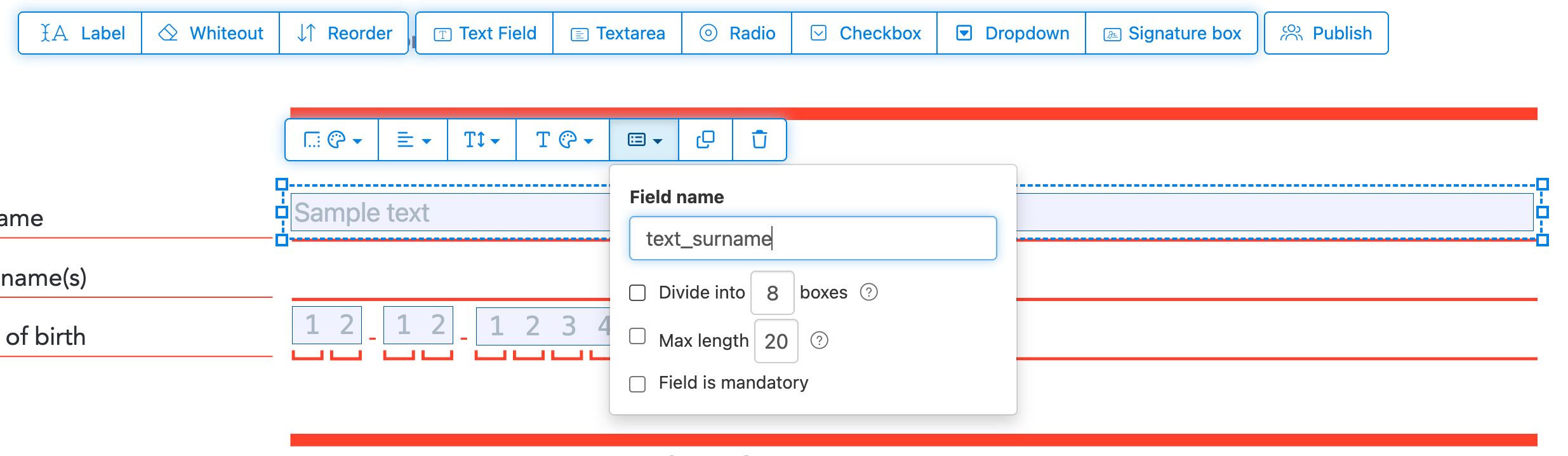
הגדירו שם לכל שדה טופס והגדירו מאפיינים ספציפיים, כמו בחירה מרובה, ערכי ייצוא ועוד.
סמן כל שדה כחובה, כך שיהיה חייב למלא אותו לפני שליחת הטופס. עבור שדות טקסט, ניתן גם להגדיר אורך תווים מקסימלי להגבלת הקלט.
ניתן להציג שדות טקסט כשדה comb, המחלק את אזור הקלט לתיבות ברווח שווה, אחת לכל תו. בשימוש נפוץ עבור שדות תאריך, מיקוד, מספרי זהות וקלטים מובנים דומים.
![]()
שינוי סדר ה-tab ב-PDF
צריך לשלוט בסדר המעבר בין השדות? לחץ על 'Reorder' כדי לסדר מחדש שדות בגרירה, או למיין אותם אוטומטית לפי שורות או עמודות.
יישר שדות PDF, multi-select ושכפל בין עמודים
בחר כמה שדות טופס בבת אחת ושכפל אותם לעמוד אחר, שימושי כשבונים טפסים מרובי עמודים עם חלקים חוזרים.
השתמש בכלי היישור כדי להציב כמה שדות טופס בקו אחד. יישר לפי קצה שמאלי, ימני, עליון או תחתון למראה נקי ומקצועי.
פרסום לאחרים למילוי וחתימה
כשהטופס מוכן, השתמש בכפתור 'Publish' כדי ליצור קישור לשיתוף. כל מי שיש לו את הקישור יכול לפתוח את הטופס, למלא אותו ולשלוח לך אותו במייל. הקישור לא פג תוקף ואפשר לשתף אותו באתר או במייל.
-
שמרו את המסמך
לחצו על 'החלת שינויים'. כשהעיבוד יסתיים, שמרו את המסמך המעודכן.
כעת יש לכם מסמך PDF למילוי שניתן למלא בקלות בצורה אלקטרונית, ללא הדפסה.