Google Drive
 OneDrive
Παρακάτω δείχνουμε πώς να μετατρέψεις ένα PDF σε fillable φόρμα
-
Επίλεξε ένα υπάρχον έγγραφο PDF
Κάντε κλικ στο 'Upload' για να επιλέξετε αρχείο. Δεν υπάρχει έγγραφο; Ξεκίνα με ένα κενό template.
-
Πρόσθεσε fillable πεδία φόρμας στο PDF σου
Δες το περιεχόμενο του εγγράφου και πρόσθεσε fillable πεδία όπου χρειάζεται.
Μπορείς να επιλέξεις από τους παρακάτω τύπους πεδίων:
- Text Field: μία γραμμή κειμένου
- Textarea: πολλαπλές γραμμές κειμένου
- Radio: επίλεξε μόνο ένα από μια ομάδα
- Checkbox: επίλεξε μία ή περισσότερες επιλογές
- Dropdown: επίλεξε μία ή περισσότερες επιλογές από drop-down λίστα
- Signature box: πεδίο υπογραφής για να υπογράψουν άλλοι
Πώς να δημιουργήσεις ένα fillable PDF text field
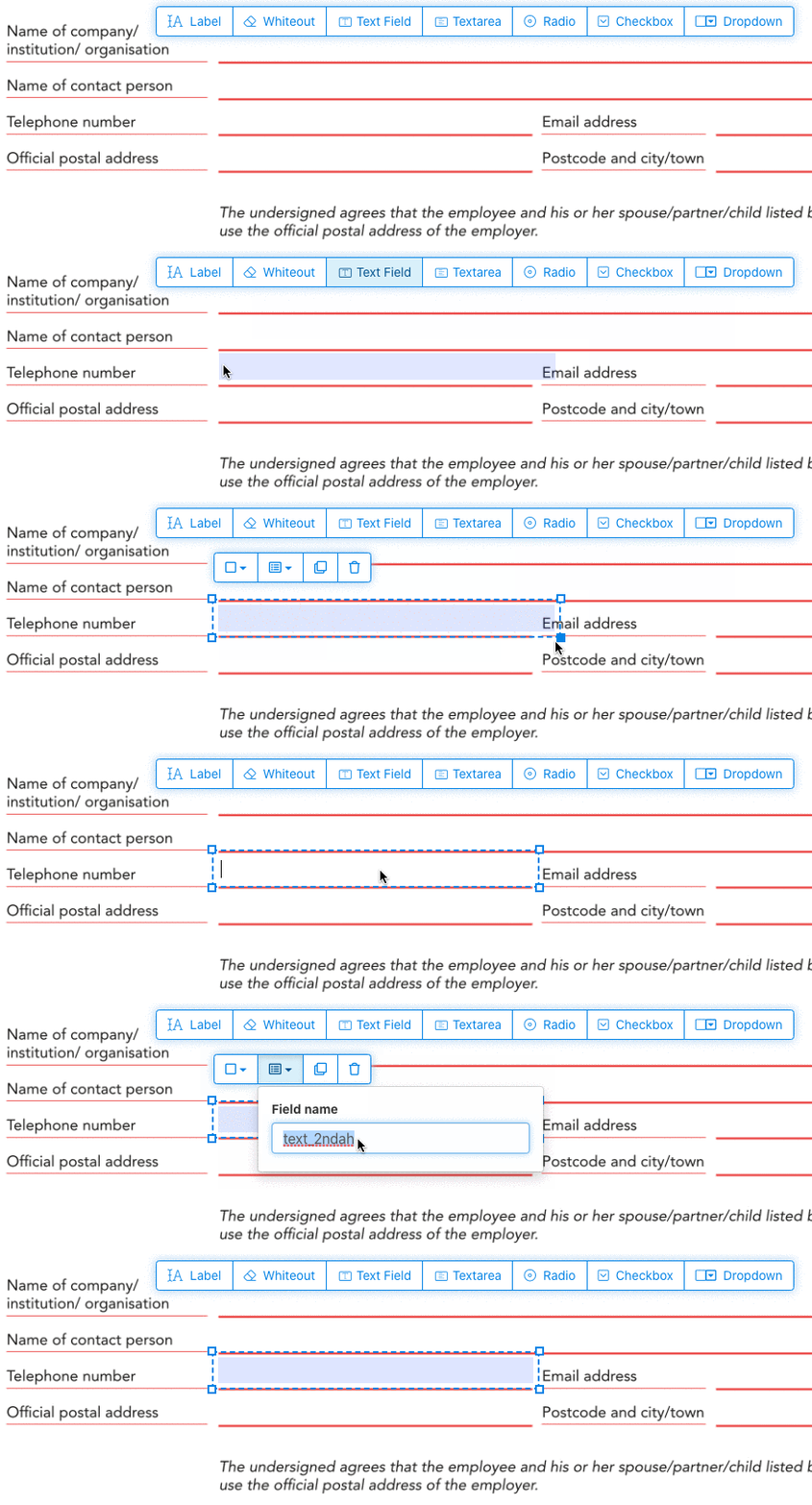
Πάτα στο στοιχείο πεδίου κειμένου από το μενού. Μετά πάτα στη σελίδα για να βάλεις ένα νέο πεδίο κειμένου.
![]()
Φτιάξε checkboxes, radio buttons ή dropdown
Όλα τα άλλα πεδία φόρμας προστίθενται με τον ίδιο τρόπο.
Τα radio buttons ομαδοποιούνται χρησιμοποιώντας το ίδιο όνομα πεδίου φόρμας για όλα τα κουμπιά. Αυτό διασφαλίζει ότι μόνο ένα είναι επιλεγμένο κάθε φορά. Όταν ο χρήστης επιλέγει ένα, τα άλλα radio buttons της ομάδας αποεπιλέγονται.
Άλλαξε το χρώμα του περιγράμματος. Ρύθμιση χρώματος κειμένου σε πεδία φόρμας PDF
Βάλε πεδία φόρμας με διαφανές περίγραμμα ή διάλεξε το χρώμα που σου ταιριάζει. Το χρώμα του κειμένου των πεδίων PDF μπορεί να ρυθμιστεί.
Η στοίχιση του κειμένου μπορεί να οριστεί ως 'Left', 'Center' ή 'Right'. Το μέγεθος της γραμματοσειράς μπορεί να οριστεί σε μια συγκεκριμένη τιμή ή να παραμείνει στο 'Auto' ώστε να προσαρμόζεται αυτόματα ανάλογα με το κείμενο.
Έλεγξε τα ονόματα των πεδίων και άλλες ιδιότητες
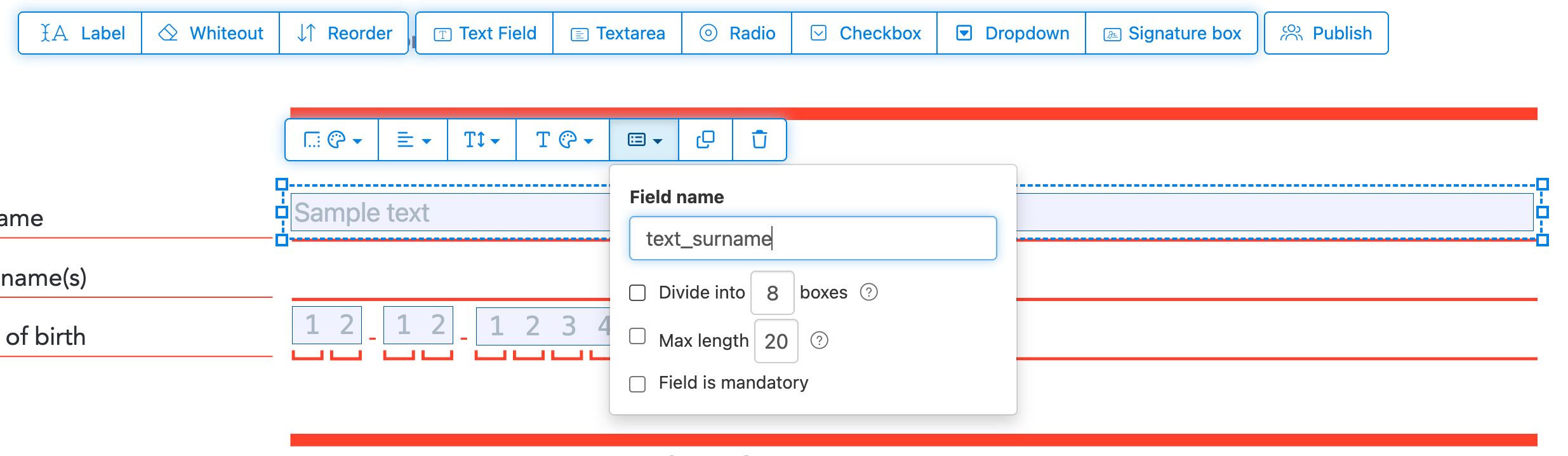
Όρισε το όνομα για κάθε πεδίο και ρύθμισε ιδιότητες, όπως multiselect, τιμές εξαγωγής και άλλα.
Σήμανε οποιοδήποτε πεδίο ως υποχρεωτικό, ώστε να πρέπει να συμπληρωθεί πριν την υποβολή της φόρμας. Για τα πεδία κειμένου, μπορείς επίσης να ορίσεις μέγιστο αριθμό χαρακτήρων για να περιορίσεις την εισαγωγή.
Τα πεδία κειμένου μπορούν να εμφανιστούν ως comb field, χωρίζοντας την περιοχή εισαγωγής σε κουτάκια ίσων αποστάσεων, ένα για κάθε χαρακτήρα. Χρησιμοποιείται συχνά για πεδία ημερομηνίας, ταχυδρομικούς κώδικες, αριθμούς ταυτότητας και παρόμοια δομημένα δεδομένα.
![]()
Αλλαγή σειράς tab στο PDF
Θέλεις να ελέγξεις τη σειρά με την οποία γίνεται η περιήγηση στα πεδία με το tab; Πάτα 'Reorder' για να αλλάξεις τη σειρά των πεδίων με drag and drop, ή κάνε αυτόματη ταξινόμηση ανά γραμμές ή στήλες.
Ευθυγράμμιση πεδίων PDF, multi-select και δημιουργία αντιγράφων σε όλες τις σελίδες
Επίλεξε πολλά πεδία φόρμας ταυτόχρονα και αντέγραψέ τα σε άλλη σελίδα, χρήσιμο για φόρμες πολλών σελίδων με επαναλαμβανόμενες ενότητες.
Χρησιμοποίησε τα εργαλεία ευθυγράμμισης για να στοιχίσεις πολλά πεδία φόρμας μεταξύ τους. Ευθυγράμμισε αριστερά, δεξιά, πάνω ή κάτω για μια καθαρή, επαγγελματική διάταξη.
Δημοσίευση για συμπλήρωση & υπογραφή από άλλους
Μόλις η φόρμα σου είναι έτοιμη, χρησιμοποίησε το κουμπί 'Publish' για να δημιουργήσεις ένα link. Όποιος έχει το link μπορεί να ανοίξει τη φόρμα, να τη συμπληρώσει και να τη στείλει πίσω με email. Το link δεν λήγει και μπορεί να κοινοποιηθεί σε ιστότοπο ή μέσω email.
-
Αποθήκευσε το έγγραφό σου
Πάτα στο 'Εφαρμογή αλλαγών'. Μόλις ολοκληρωθεί η επεξεργασία, αποθήκευσε το ενημερωμένο έγγραφο.
Θα έχεις ένα συμπληρώσιμο PDF που συμπληρώνεται εύκολα ηλεκτρονικά, χωρίς εκτύπωση.