Google Drive
 OneDrive
Nedan visar vi hur du konverterar en PDF till ett ifyllbart formulär
-
Välj ett befintligt PDF-dokument
Klicka på 'ladda upp' för att välja en fil. Inget befintligt dokument? Börja med en blank mall.
-
Lägg till ifyllbara formulärfält i ditt PDF-formulär
Gå igenom dokumentets befintliga innehåll och lägg till ifyllbara formulärfält där det behövs.
Du kan välja mellan följande fälttyper:
- Textfält: enstaka textrad
- Textarea: flera textrader
- Radio: välj endast en från en grupp
- Checkbox: bocka för ett eller flera alternativ
- Dropdown: välj ett eller flera alternativ från en dropdown-lista
- Signaturruta: signaturruta för andra att signera
Hur man skapar ett ifyllbart PDF-textfält
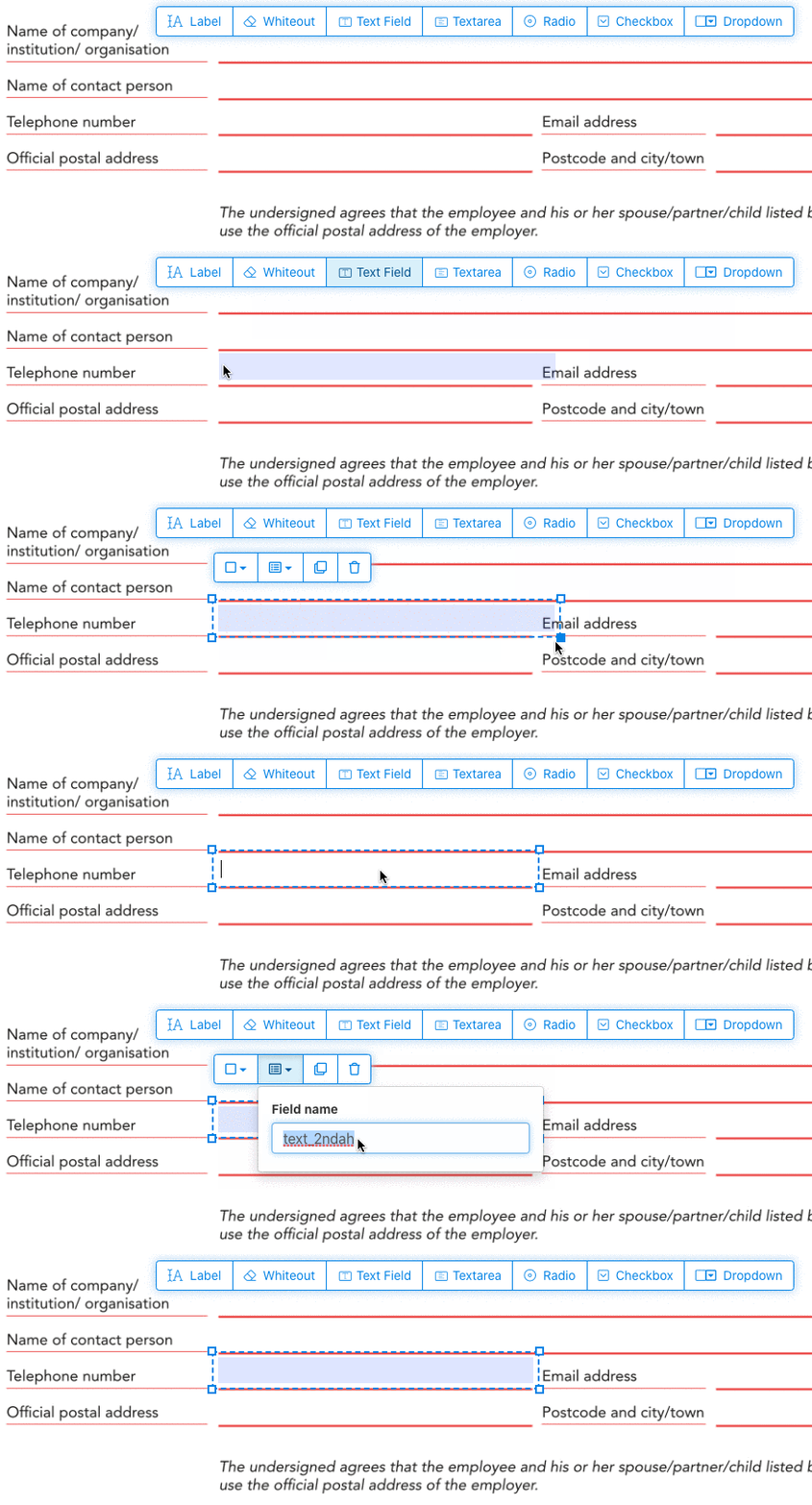
Klicka på textfältet i menyn. Klicka sedan på sidan för att placera ett nytt textfält.
![]()
Skapa kryssrutor, radioknappar eller dropdown
Alla andra formulärfält kan läggas till på samma sätt.
Radioknappar grupperas tillsammans genom att använda samma fältnamn för alla knappar. Detta säkerställer att endast en är markerad åt gången. När användaren väljer en, avmarkeras de andra radioknapparna i gruppen.
Ändra kantfärg. Konfigurera textfärg i PDF-formulärfält
Ha formulärfält med transparent kant eller välj den färg som passar bäst. Färgen på texten i PDF-fälten kan konfigureras.
Textjusteringen kan konfigureras som 'Vänster', 'Centrerad' eller 'Höger'. Teckensnittsstorleken kan ställas in på ett specifikt värde eller lämnas som 'Auto' så att den justeras automatiskt baserat på mängden text.
Kontrollera formulärfältens namn och egenskaper
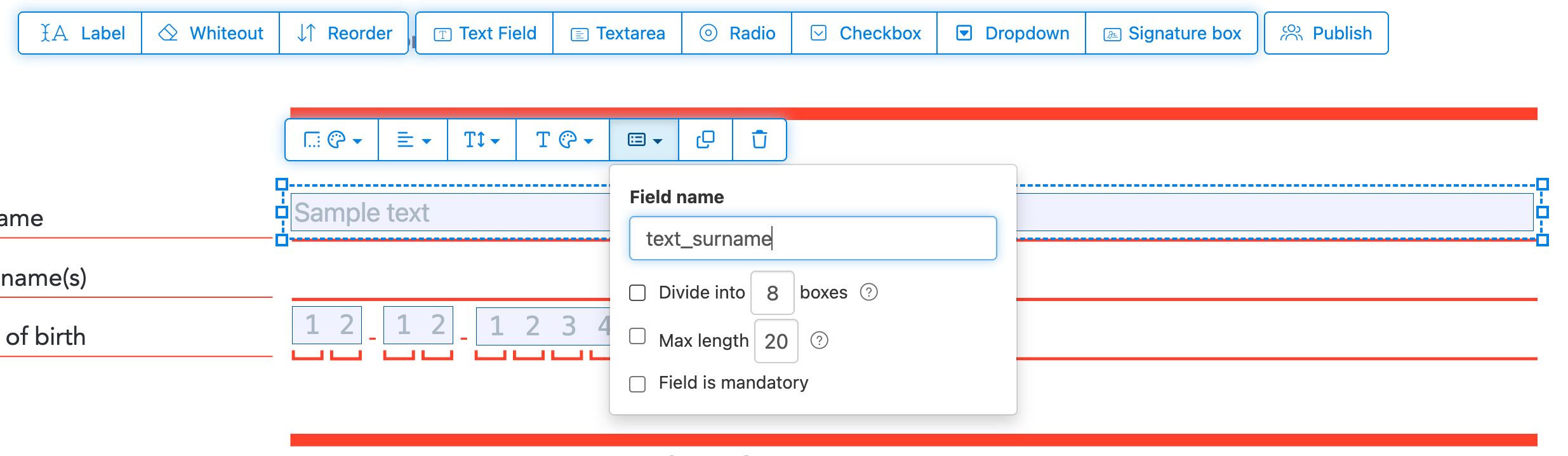
Definiera namnet för varje formulärfält och konfigurera egenskaper som flerval, exportvärden med mera.
Markera valfritt fält som obligatoriskt, så att det måste fyllas i innan formuläret kan skickas. För textfält kan du även ställa in en maximal teckenlängd för att begränsa inmatningen.
Textfält kan visas som ett kamfält, vilket delar upp inmatningsytan i lika stora rutor, en per tecken. Används ofta för datumfält, postnummer, ID-nummer och liknande strukturerad inmatning.
![]()
Ändra tabbordning i PDF
Behöver du styra i vilken ordning man tabbar genom fälten? Klicka på 'Reorder' för att ändra ordning genom att dra och släppa, eller sortera dem automatiskt efter rader eller kolumner.
Justera PDF-fält, multi-select och duplicera över sidor
Markera flera formulärfält samtidigt och duplicera dem till en annan sida, smidigt när du skapar flersidiga formulär med återkommande avsnitt.
Använd justeringsverktygen för att rada upp flera formulärfält med varandra. Justera efter vänster-, höger-, över- eller nederkant för en snygg och professionell layout.
Publicera för andra att fylla i & signera
När ditt formulär är klart, använd 'Publish'-knappen för att skapa en delningsbar länk. Alla med länken kan öppna formuläret, fylla i det och skicka tillbaka det till dig via mejl. Länken löper inte ut och kan delas på en webbplats eller i ett mejl.
-
Spara ditt dokument
Klicka på 'Apply changes'. När bearbetningen är klar, spara ditt uppdaterade dokument.
Du bör nu ha en ifyllbar PDF som enkelt kan fyllas i digitalt, utan utskrift.