Google Drive
 OneDrive
아래에서 PDF를 입력 가능한 양식으로 변환하는 방법을 알려줄게요
-
기존 PDF 문서 선택
파일을 선택하기 위해 '업로드'를 클릭하세요. 기존 문서가 없나요? 빈 템플릿으로 시작하세요.
-
PDF 양식에 입력 필드 추가
문서 내용을 확인하며 필요한 곳에 입력 필드를 추가하세요.
다음 필드 유형 중에서 선택할 수 있어요:
- 텍스트 필드: 한 줄 텍스트
- 텍스트 영역: 여러 줄 텍스트
- 라디오: 그룹에서 하나만 선택
- 체크박스: 하나 이상의 선택 사항 체크
- 드롭다운: 드롭다운 목록에서 하나 이상의 옵션 선택
- 서명 박스: 다른 사람이 서명할 수 있는 서명 박스
입력 가능한 PDF 텍스트 필드 만드는 방법
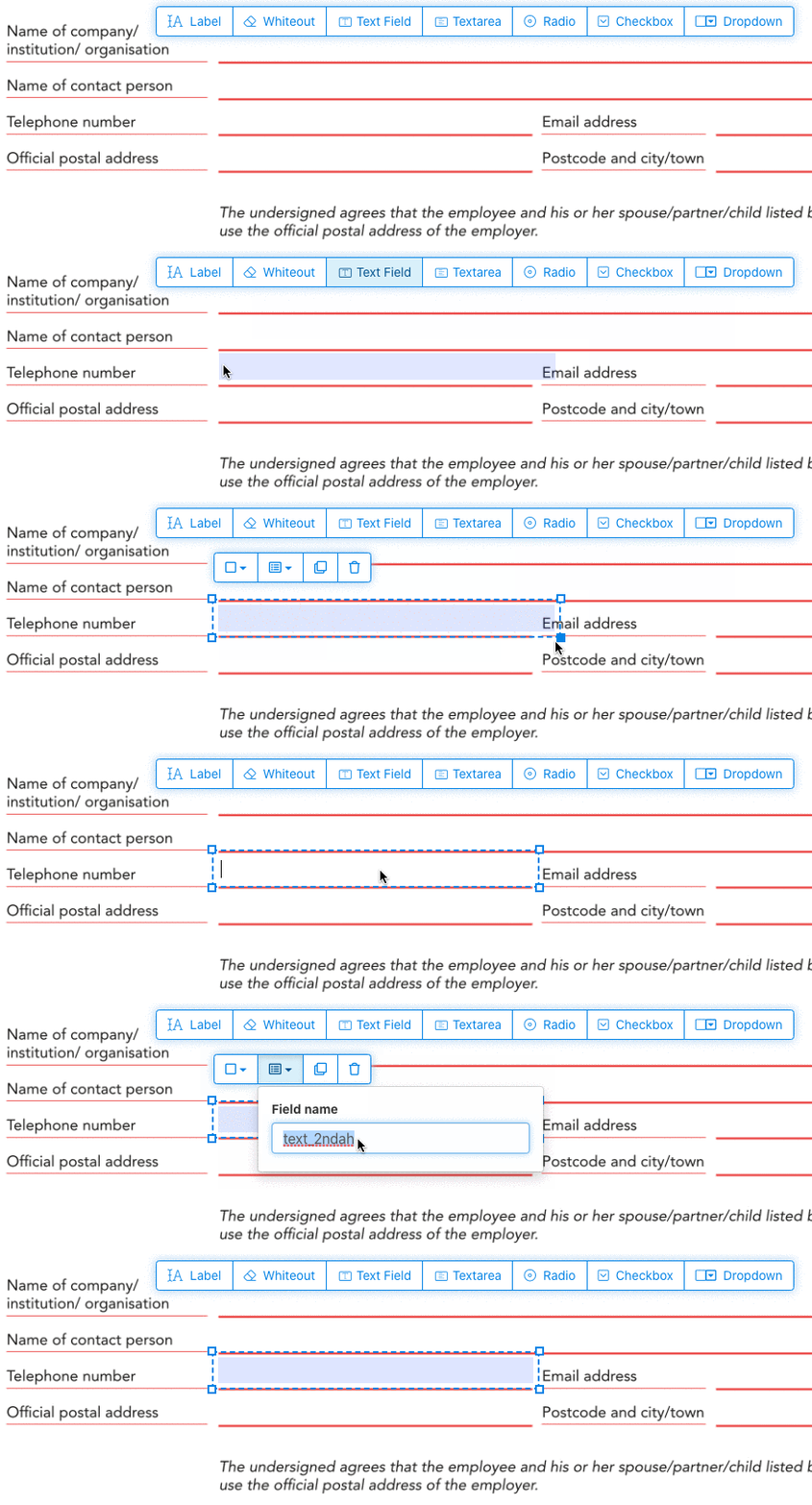
메뉴에서 텍스트 필드 항목을 클릭하세요. 그런 다음 페이지를 클릭하여 새 텍스트 필드를 배치하세요.
![]()
체크박스, 라디오 버튼 또는 드롭다운 만들기
다른 모든 양식 필드도 같은 방법으로 추가할 수 있어요.
라디오 버튼은 모든 버튼에 동일한 양식 필드 이름을 사용하여 하나로 그룹화돼. 이렇게 하면 한 번에 하나만 선택되도록 할 수 있어. 사용자가 하나를 선택하면 그룹 내 다른 라디오 버튼은 선택 해제돼.
테두리 색상 변경. PDF 양식 필드의 텍스트 색상 설정
필드 테두리를 투명하게 설정하거나 원하는 색상을 선택하세요. PDF 필드의 텍스트 색상을 설정할 수 있어.
텍스트 정렬은 'Left', 'Center' 또는 'Right'로 설정할 수 있어. 글꼴 크기는 특정 값으로 설정하거나 'Auto'로 두어 입력된 텍스트 양에 따라 자동으로 조절되게 할 수 있어.
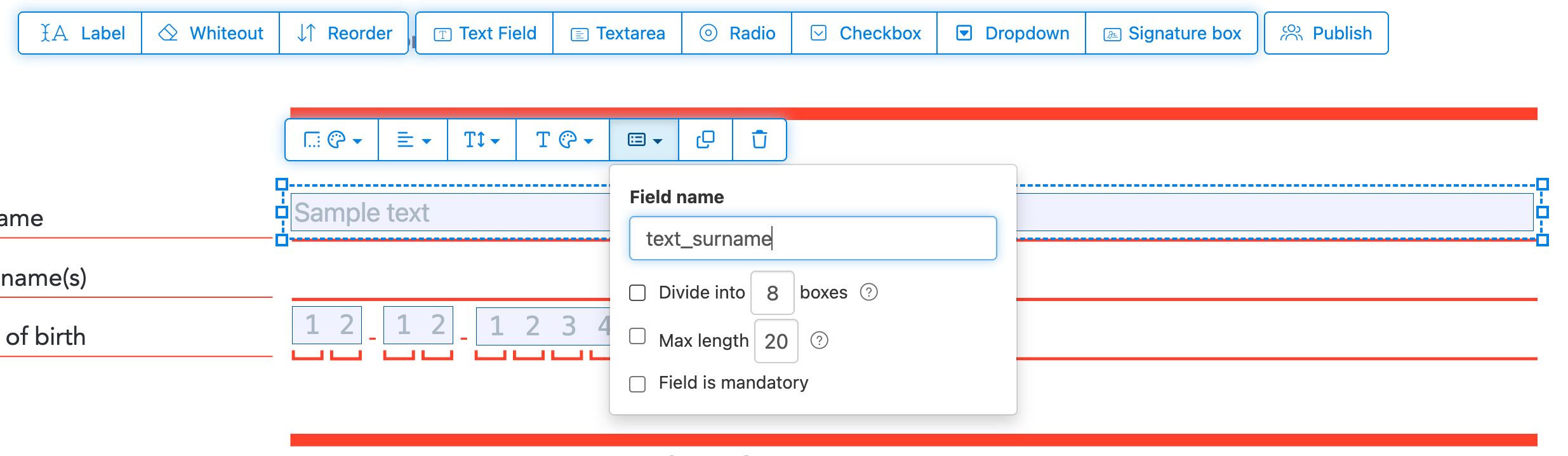
필드 이름 및 기타 속성 제어
각 필드 이름을 정의하고 다중 선택, 내보내기 값 등의 속성을 구성하세요.
필드를 필수 항목으로 표시하면 양식을 제출하기 전에 반드시 완료해야 해. 텍스트 필드의 경우 입력을 제한하기 위해 최대 글자 수를 설정할 수도 있어.
텍스트 필드는 입력 영역을 한 글자당 하나씩 균등한 간격의 상자로 나누는 콤(comb) 필드로 표시될 수 있어. 주로 날짜 필수, 우편번호, ID 번호 및 이와 유사한 구조화된 입력에 사용돼.
![]()
PDF 탭 순서 변경
탭 키로 필드를 이동하는 순서를 조정해야 해? 'Reorder'를 클릭해서 드래그 앤 드롭으로 양식 필드 순서를 바꾸거나, 행 또는 열 단위로 자동 정렬해봐.
PDF 필드 정렬, 다중 선택 및 페이지 간 복제
여러 양식 필드를 한 번에 선택하고 다른 페이지로 복제하세요. 반복 섹션이 있는 다중 페이지 양식을 만들 때 유용해요..
정렬 도구를 사용하여 여러 양식 필드를 서로 맞추세요.. 왼쪽, 오른쪽, 위쪽 또는 아래쪽 가장자리에 맞춰 정렬하여 깔끔하고 전문적인 레이아웃을 만드세요..
다른 사람이 채우고 서명하도록 게시
양식이 준비되면 'Publish' 버튼을 사용하여 공유 가능한 링크를 생성하세요.. 링크가 있는 사람은 누구나 양식을 열고 작성하여 이메일로 다시 보낼 수 있어요.. 링크는 만료되지 않으며 웹사이트나 이메일에서 공유할 수 있어요..
-
문서 저장
'변경사항 적용' 클릭. 처리가 완료되면 업데이트된 문서를 저장하세요.
출력 없이 전자적으로 쉽게 작성할 수 있는 PDF 문서가 완성될 거예요.