Google Drive
 OneDrive
以下說明如何免費在線上為 PDF 文件添加文字浮水印. 適用於包括 Mac 在內的所有桌面平台.
步驟 1:選擇您的 PDF 文件
上傳您的文件
文件通過加密連接安全上傳. 文件保持安全. 處理後,它們將被永久刪除.
不想上傳您的文件並離線處理它們?
Try Sejda Desktop. 與在線服務功能相同,且文件永遠不會離開您的計算機.
點擊“上傳”並從您的本地計算機選擇文件.
將文件拖放到頁面上也有效.
Dropbox 或 Google Drive 文件
您也可以從 Dropbox 或 Google Drive 中選取 PDF 文件.
展開“上傳”下拉菜單並選擇您的文件.
步驟 2:添加文字浮水印
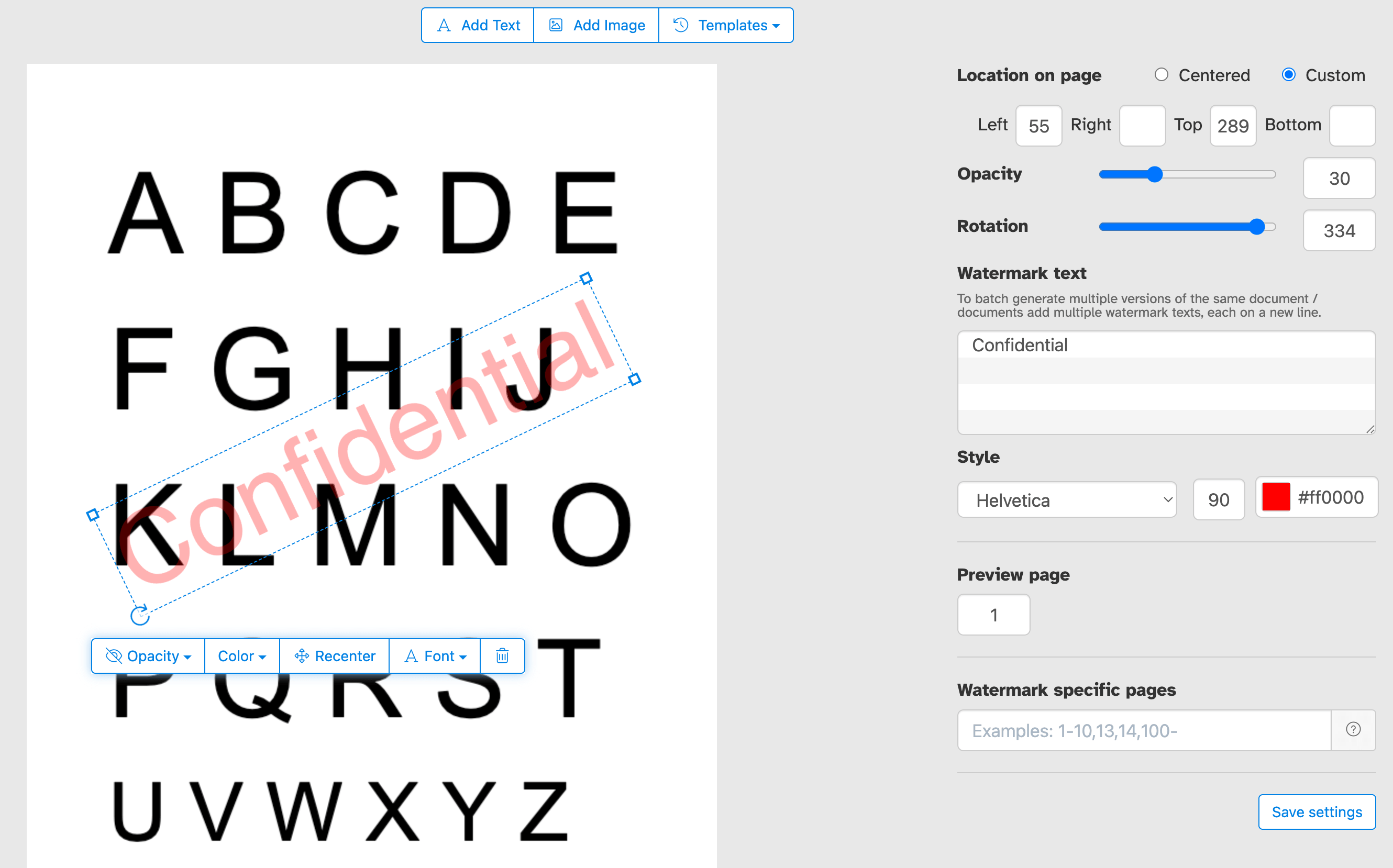
點擊 PDF 頁面頂部的 'Add Text' 按鈕. 您應該會看到文字浮水印已添加.
點擊它來編輯文字. 輸入 'Draft' 或 'Classified' 來試試看.
步驟 3:更改文字大小、旋轉和頁面位置
點擊並拖動文字浮水印來更改 PDF 頁面上的位置
拖動旋轉桿來旋轉文字浮水印.
點擊並拖動側邊的調整大小桿來更改字體大小.
步驟 4:更改文字顏色、透明度和字體系列
點擊文字浮水印來顯示其關聯菜單.
您可以更改浮水印的透明度,讓文字變得更透明或更不透明.
浮水印文字顏色也可以配置,連同文字使用的字體.
僅在部分 PDF 頁面加入浮水印
將浮水印套用到文件的每一頁,或選擇自訂頁面範圍. 無論你只想標記第一頁、最後一頁或特定頁面,都能精確控制浮水印出現的位置,無需拆分或重新組合 PDF.
精確控制頁面上的浮水印位置
將浮水印放在你想要的確切位置. 在頁面預覽中隨意點擊並拖曳,或輸入精確的 X 和 Y 座標以進行像素級定位.
在 PDF 上蓋上「Confidential」、「Draft」、「Sample」或任何自訂標籤,以控管文件的呈現與分享方式. 加入公司名稱、版權聲明或 logo 以強化品牌形象. 無論是保護敏感的商業文件、標記進行中的檔案或為客戶交付物打上品牌,我們讓你輕鬆在每一頁傳達正確的訊息.
一次為多個 PDF 文件加入浮水印或套用多個標記
在單次作業中為多個 PDF 加入浮水印以節省時間. 批量 Upload 文件,套用一次浮水印設定,然後一起下載所有蓋好章的檔案. 非常適合需要持續且高效處理大量 PDF 的團隊和企業.
你也可以提供一組文字浮水印,一次套用到多個文件中.
浮水印 PDF 範本
將浮水印設定儲存為範本,隨時重複使用. 設定好文字、字體、顏色、大小、透明度和位置後,你就能儲存該設定,只需點擊一下即可套用到未來的文件中,無需每次重新調整. 適合需要定期在多個文件中套用一致浮水印的情況.