Sejda PDF Desktop
Productive PDF software that you'll love to use
Sejda PDF Desktop 免費使用,每日有限制.
升級以獲得 PRO 功能和無限制使用.
| Free | Pro |
| 3 tasks per day | Unlimited |
| Docs up to 50MB and 200 pages | Unlimited |
| Compress files up to 100MB | Unlimited |
| OCR files up to 10 pages | Unlimited |
| Images up to 5MB | Unlimited |
| Combine up to 30 files and 50 pages | Unlimited |
| Convert files one by one | Multiple files in one go |
我們幫助您完成 PDF 任務
將文件合併為一個 PDF
直觀地合併和重新排列頁面,合併多個 PDF 文件. 交替和混合來自不同文件的奇偶頁.
拆分 PDF 文件
按頁拆分文檔. 提取單獨的文檔. 按大小、書簽或出現的文本拆分. 拆分雙頁布局掃描件
將 PDF 文件轉換為 Office 和圖像格式
將 PDF 文件轉換為 Word、Excel 和圖像. 將圖像轉換為 PDF 文件
壓縮 PDF
減小 PDF 文件的大小. 優化圖像和其他資源

編輯 PDF 文件
在您的 PDF 中添加、編輯或移動文本. 更改字體類型、大小和樣式. 插入、重排、移動或刪除頁面.
添加簽名、高亮文本和形狀
應用 PDF 密碼和限制
向 PDF 添加複製和編輯保護. 包含一個密碼以保護您的 PDF 免受未經批准的訪問
Watermark PDF
向 PDF 文檔添加圖像或文本水印
Grayscale PDF
將 PDF 文本和圖像設為灰度
裁剪 PDF
修剪 PDF 頁邊距,調整可見頁面區域,更改 PDF 頁面大小
Easy to adopt and deploy in the enterprise
- Pre-activated deployments with a volume license key
- Citrix™ and Terminal Services™ compatible
- Save costs — volume discounts start from 2 licenses (up to 60% off)
找到適合您的完美版本
找到適合您業務的完美版本
Sejda PDF Desktop 免費使用,每日有限制. 升級以獲得 PRO 功能和無限制使用.
for 10 users
- Latest features
- 7 days access to Sejda Desktop
- 7 days access to Sejda Web
for 10 users
- Latest features
- A year access to Sejda Desktop
- A year access to Sejda Web

Common questions
How can I cancel my subscription?
To cancel a recurring subscription just click 'Stop auto-renewal' from your account page. You can also email hi@sejda.com.
The Week Pass plan is a one-time charge, not a recurring subscription. It does not automatically renew and downgrades to free after 7 days.
Will my subscription be automatically renewed?
The Week Pass plan is a one-time charge, not a recurring subscription. It does not automatically renew and downgrades to free after 7 days.
Desktop Annual is a recurring subscription and will continue until you cancel.
Subscriptions auto-renew at the end of each term and you will be charged for the subsequent term.
What is the difference between Sejda Desktop and Sejda Web?
Sejda Web is the online, browser-based service, where files are uploaded and processed on our servers.
Sejda Desktop is an application that you can install on your computer and files are processed locally, on your computer.
Does Sejda Desktop process files locally?
Yes, with Sejda Desktop files are processed on your computer, not uploaded to our servers.
Can I use Sejda Desktop on both my laptop and my desktop?
Yes, you can use one license of Sejda Desktop on both your laptop and your desktop, given you are the only one using Sejda Desktop on these computers.
Do you offer a perpetual license?
No, we don't offer perpetual licenses anymore.
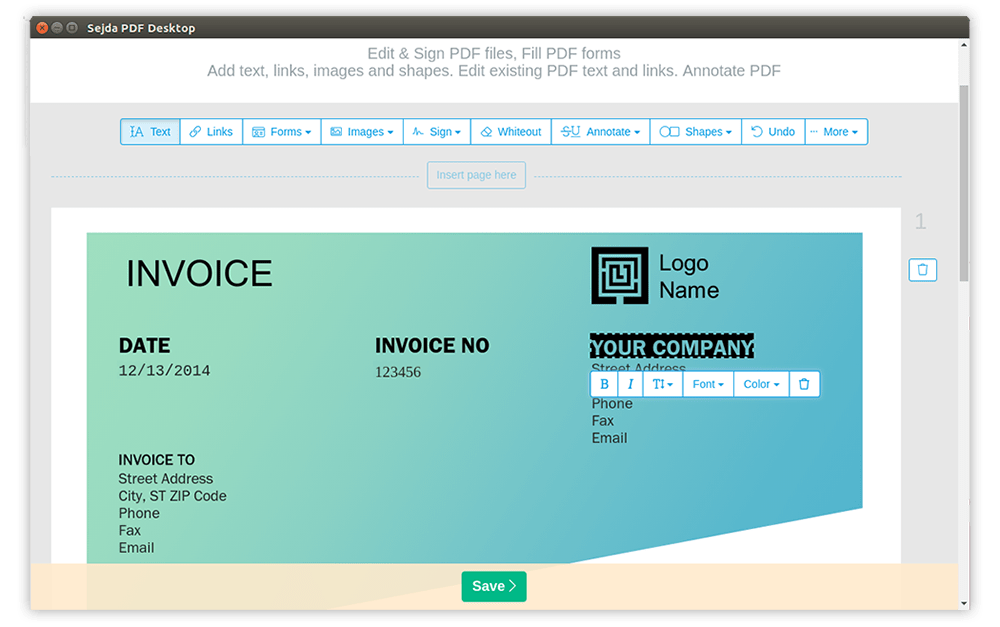
Ubuntu Linux Chromebook PDF Editor
如何在 Ubuntu Linux 或 Chromebook 上編輯 PDF
-
打開文件於 Linux 版本的 Sejda Desktop or use the 在線 PDF 編輯器
-
點擊頂部菜單中的文本工具
-
通過點擊現有文本開始編輯來更改文本. 在 PDF 頁面上添加文本.
-
在頁面上添加圖像. 點擊並拖動以移動、調整大小或旋轉圖像
-
填寫 PDF 表格並添加簽名. 繪製、打字或上傳您的簽名圖像
-
為 PDF 頁面添加注釋、高亮文本並用刪除線標記更改
-
向網頁 URL 或文檔中的頁面添加新鏈接. 輕鬆編輯 PDF 中現有的超鏈接
-
輕鬆查找並替換 PDF 中所有出現的單詞. 塗白頁面的部分內容.添加形狀
-
點擊應用更改並保存編輯後的文檔